Ro Ghoul Hack Roblox
5 years ago
What is the content you’ll be using in your lesson?
The content that I will be using for my lesson is found in the Utah state core curriculum for 4th grade. It is under Standard 3, Objective 1, c which states "Sort rocks by appearance according to the three basic types: sedimentary, igneous and metamorphic (e.g., sedimentary–rounded-appearing mineral and rock particles that are cemented together, often in layers; igneous–with or without observable crystals that are not in layers or with or without air holes or glasslike; metamorphic –crystals/minerals, often in layers)." As a freshman in elementary education I took a physical science class where we had to memorize 40 sedimentary, igneous, and metamorphic rocks. I do not remember learning these when I was in elementary school, and it was difficult for me to do well with the rocks. I believe this lesson will make it more meaningful and memorable to young fourth graders.
What is the pedagogy you’ll be using and why is it a good fit with the content?
I am using good pedagogy by selecting content, classifying rocks, that is normally hard to understand and unclear why it is important to learn. This lesson plan is very engaging and exciting, and I know students will have fun learning about rocks. The students will not be bored learning about rocks, which is normally not a favorite subject. Making science fun is always a plus, and a skill teachers need to aquire. I made a lesson plan that includes very up to date technology which is what students will need to know how to do. I know my students will be on computers even more than I am now, when they are in college and in a profession. My students need to be computer savvy and know how to do many computer programs.
What is the technology you’ll be using and why is it a good fit with the content and pedagogy?
The technology I will be using for this lesson is Google Earth. This program is a perfect fit for the content to enable students to see real examples of each type of rock, on the earth. Students can see what it is like in every country, and recognize the similarities between them. Google Earth allows me to zoom in on any country, city, or landmark, and also see what it would look like from a "street view." There is no other tool that allows you to look at locations all across the globe with such precision and detail. This technology is great for my pedagogy because this program lets kids explore individually. Each student works at a different pace, therefore it is helpful for them to explore and learn on their own. Google Earth is great for many reasons, and it can also allow students to easily find locations they need, and become aware of additional information concerning a location, or country.
Hooray for Google Earth!
| Location | Activity | Picture |
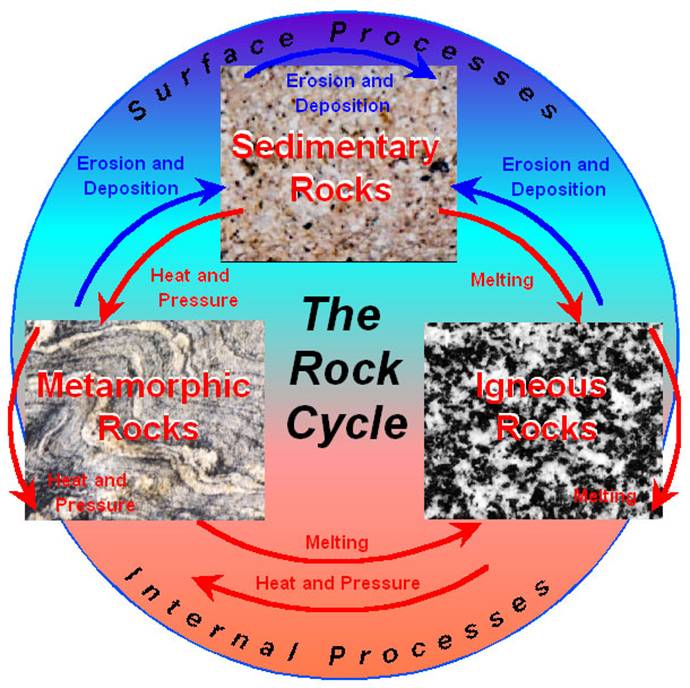
| 1. Japan, Hokkaido, Mount Rausu (igneous) | Briefly introduce the rock cycle and explain that they will see places where all 3 parts occur. Have students reach the location on GoogleEarth. Ask the students what type of rock is formed at the volcano they see at Mount Rausu; discuss what happens in forming igneous rocks. Then have them watch the igneous rock video at
|  |
| 2. Grand Canyon, Arizona(sedimentary) | Have students reach the location on GoogleEarth. Teacher will explain process of forming sedimentary rocks. Have them watch the sedimentary rock video at
|  |
| 3. Manualoa, Hawaii (metamorphic) | Have students reach the location on GoogleEarth. Teacher will explain process of forming metamorphic rocks. Have them watch the metamorphic rock video at
|  |
| 4. Karnataka, India (sedimentary) | Have students reach the location on GoogleEarth. Have students explore this area using the zoom features and others available to identify at least one type of rock in the area. Once students identified one rock formation have students explore other locations and the rocks there. |  |
| Details of image overlay / path / polygon: | In our Google tour we used the Geographic web features of Panoramio. We also used the terrain feature, and labels so the students would know what they were actually looking at. Our tour began at Mount Rausu, Japan, it then went to the Grand Canyon, Arizona, next it went to Manualoa, Hawaii, and finally to Karnataka, India. The path shows the travel route to each location, visually. |
SOURCES:
Igneous Rock Formation:
http://www.outreach.canterbury.ac.nz/resources/geology/glossary/igneous.jpg
Three Types of Rock Formation:
http://i.ehow.com/images/GlobalPhoto/Articles/2281951/RockCycle-main_Full.jpg
The Rock Cycle:
http://web.ics.purdue.edu/~braile/edumod/pebble/pebbleAM_files/image007.jpg
Sedimentary Rock Formation:
http://www.energyinst.org.uk/education/glossary/images/sediment.gif
Metamorphic Rock Formation:
http://www.bbc.co.uk/schools/ks3bitesize/science/images/sci_dia_33.gif
Metamorphic Rocks:
http://honolulu.hawaii.edu/distance/geolab/R*M/metrx.jpg
Igneous Rocks:
http://honolulu.hawaii.edu/distance/geolab/R*M/metrx.jpg
Sedimentary Rocks:
http://honolulu.hawaii.edu/distance/geolab/R*M/sedrx.jpg